

Breathing disturbances during sleep are far more common than most people realize, and they often go completely unnoticed. Conditions like obstructive sleep apnea affect hundreds of millions of people worldwide, yet a large percentage remain undiagnosed. Even milder, subclinical breathing irregularities can fragment sleep and leave you feeling exhausted, foggy, or unrested, night after night.
That’s why Pillow is introducing a powerful new way to understand how breathing disruptions affect your sleep, not just record that they happened.
With the new Breathing Disturbances insights, Pillow doesn’t simply surface raw data. It processes, contextualizes, and interprets breathing disturbance signals and places them directly within your sleep analysis—so you can understand what’s happening, why it matters, and whether it’s changing over time.
Why Breathing Disturbances Matter for Sleep
Breathing disturbances are brief episodes where airflow becomes restricted or irregular during sleep. You may never fully wake up—but your body reacts. These events can:
- Fragment deeper stages of sleep
- Increase nighttime stress on the cardiovascular system
- Reduce how refreshed you feel in the morning
- Mask the true cause of chronic fatigue or poor sleep quality
Over time, even relatively infrequent disturbances can add up.
Pillow helps you see the hidden layer of your sleep, revealing whether breathing disruptions may be contributing to patterns you’ve already noticed—like elevated heart rate, restless sleep, or declining sleep quality.
What Makes Pillow Different from Apple Health
Apple Health records breathing disturbance events and categorizes them between “Elevated” and “Not Elevated” and …it stops there.
Pillow goes further by turning those events into meaningful sleep insights:
- It interprets breathing disturbances in the context of your sleep, not in isolation
- It highlights severity, not just occurrence
- It shows trends, not just nightly snapshots
- It establishes a personal baseline, so you can see when something is truly off for you
This means you’re not left guessing whether a number is “normal,” concerning, or simply noise.
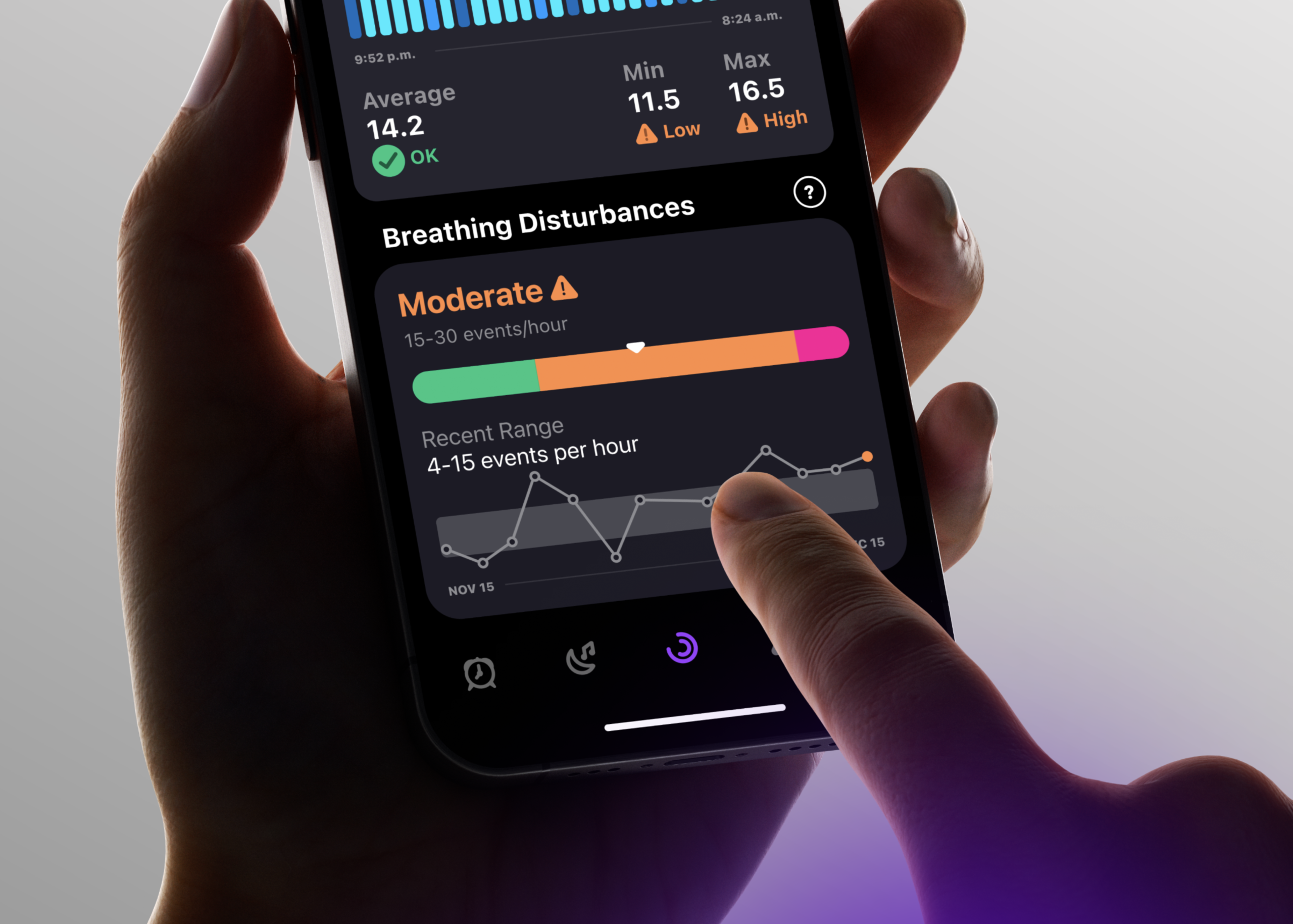
How Pillow Helps You Understand What You’re Seeing
Severity classification
Each night is categorized as Good, Mild, Moderate, or Severe, based on clinically recognized thresholds from the Apnea-Hypopnea Index (AHI). This instantly answers the most important question: Should I pay attention to this?
Trends over time
A built-in 14-day view reveals whether breathing disturbances are improving, worsening, or staying consistent—something that’s impossible to understand from a single night.
Your personal baseline
Pillow learns your typical range from historical data, helping you spot deviations that may matter even if your numbers don’t look alarming on paper.
All of this lives directly inside your Sleep Diary, alongside heart rate, breathing rate, and sleep stages, where it belongs.
Who Will Benefit Most from This Feature
This insight is especially valuable if you:
- Suspect sleep apnea (or have already been diagnosed) and want an easier way to notice night-to-night patterns.
- Wake up unrefreshed despite adequate time in bed, or experience daytime sleepiness, morning headaches, or loud snoring (common signs that can co-occur with sleep-disordered breathing).
- Have risk factors linked to obstructive sleep apnea, such as higher body weight/body composition changes, larger neck circumference, increasing age, alcohol use near bedtime, or family history.
- Play or train in contexts where those risk factors are more common. E.g., some strength/power or contact-sport athletes with a history of head injury, where higher OSA prevalence.
- Want to spot meaningful changes over time (for example, after weight changes, travel, illness, or lifestyle shifts) so you know when it may be worth following up.
Pillow is not a diagnostic tool, but it can help you recognize patterns worth discussing with a healthcare professional, especially if breathing disturbances are persistently elevated or trending upward.
Where to Find Breathing Disturbances in Pillow
To use this feature, you’ll need to meet Apple’s setup requirements, including:
- An Apple Watch running the latest watchOS
- An iPhone updated to the latest iOS
In Pillow, open the Sleep Diary, select a sleep session, tap the Heart tab, and scroll to Breathing Disturbances.
A Clearer Picture of Your Sleep, Not Just More Data
Breathing disturbances don’t exist in isolation, and they shouldn’t be viewed that way.
By integrating breathing disturbance insights directly into your sleep analysis, Pillow helps you understand how these events relate to how you sleep, how you feel, and how your patterns change over time.
It’s time to discover what might be silently disrupting your sleep, and finally have the context to do something about it.