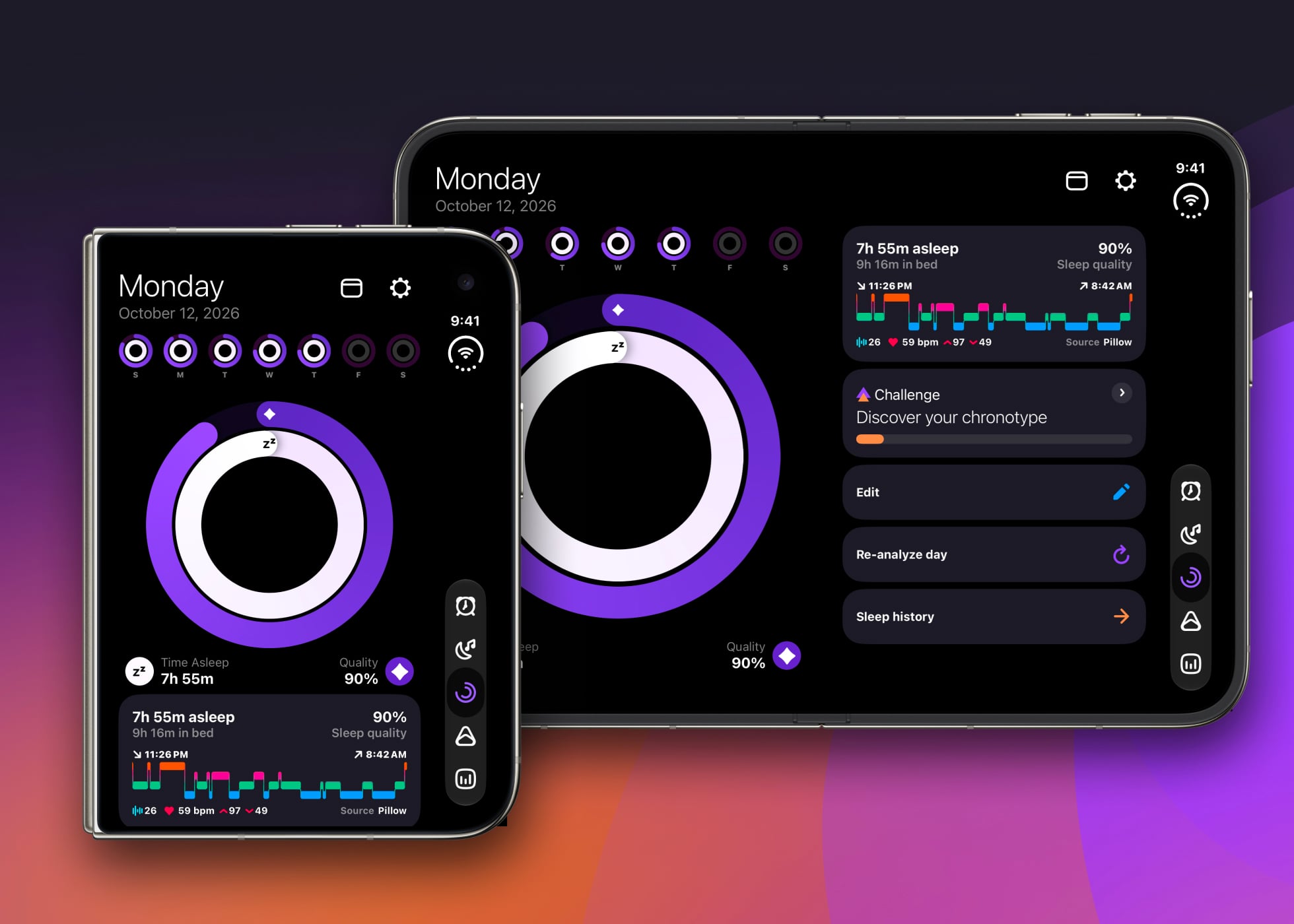
Pillow 6.7 brings layouts designed for iPhone Duo, so your sleep data, alarms and Sleep Aid feel at home on both displays, folded or unfolded.
A new kind of iPhone deserves more than a stretched version of the app you already know. iPhone Duo folds out from a familiar phone into a much larger canvas, and the apps that feel best on it are the ones that were rethought for that space rather than simply scaled up. That is exactly what we set out to do with Pillow.
Pillow 6.7 is optimised for iPhone Duo. Whether you check last night's sleep on the outer display with one hand, or open it up to look through a month of trends over breakfast, Pillow now shapes itself around the screen in front of you.
More Room for Your Night
Open iPhone Duo and Pillow puts the extra space to work. The large inner display gets wide layouts across the app, from the Sleep Diary and your sleep analysis to Discover, Sleep Aid and Settings, so you see more of your night at a glance instead of scrolling through a tall, narrow column. Trends spreads its cards across two or three columns, which makes comparing weeks and spotting patterns noticeably easier, and your sleep stages, heart rate and audio recordings finally get the room they deserve.
Close it again and Pillow is the same quick, familiar app on the outer display, ready for a fast look at how you slept before you even get out of bed.
Folded, Unfolded, and Everything in Between
The moment you fold or unfold, Pillow resizes on the spot, so you never lose your place halfway through last night's analysis. When the device is only partly open, Pillow keeps its buttons and controls clear of the fold, so nothing important sits where the screen bends. On the open display, navigation buttons such as Back, Close and Done move into the system bar along the edge, which leaves the main view free for your data.
It is the kind of care you mostly notice by not noticing it. Pillow simply looks right, whichever way you are holding it.
Built for Your Bedside, Too
The details that matter at night got the same attention. When your alarm rings with iPhone Duo opened wide, the Stop button is right there on screen. The sleep tracking countdown keeps its controls within easy reach, and the Sleep Aid mini player stays fully visible, Pause button included, so you can stop a soundscape without hunting for it in the dark. Stories and What's New look right on both displays as well.
Everything You Already Love, With More Space
Under the new layouts, Pillow is the app you know: automatic sleep tracking with your Apple Watch or tracking with your iPhone, detailed sleep stage analysis, snoring and sleep talk detection, Smart Wake Up, and a library of sleep sounds and stories. Sleep and audio analysis still runs on your device, and no account is required.
iPhone Duo support is part of the free update for everyone, so there is nothing extra to unlock.
Ready When You Unfold
Just picked up iPhone Duo? Get Pillow on the App Store, or update to the latest version, and see your nights on a whole new canvas.
Frequently Asked Questions
Do I need to pay for iPhone Duo support?
No. The new layouts are part of Pillow 6.7, a free update for everyone. Premium features such as Smart Wake Up and Discover work the same way they do on any other iPhone.
Which version of Pillow do I need?
Pillow 6.7 or later, available now on the App Store.
Will my sleep history move to my new iPhone Duo?
If iCloud sync is turned on, your sleep history follows you to your new device.
Does anything change on iPad?
Pillow has always been a universal app, and this update brings the wider, multi-column Trends layout to iPad as well.